← Search All 200+ Devices
Nextbase Dashcams ✓ Verified Compatibility • Last checked: October 2026

Best Memory Card or USB for Nextbase 222XR & 322GW Rear Camera Bundle

Format: microSD Card Max Capacity: 128GB Best Size: 128GB Min Speed: U3 / V30
Nextbase 222XR & 322GW Rear Camera Bundle compatible slot illustration
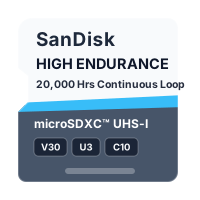
✓ Quick Answer: Get a 128GB SanDisk High Endurance or MAX Endurance microSD card.
Good to know: Avoid standard non-endurance cards—dashcams overwrite video non-stop and will quickly burn out standard consumer cards, causing frozen screens or 'SD Card Error'. Find out why →
⏱ How much does it hold? Dual-channel recording (front + rear camera simultaneously): 64GB ≈ 4 hrs • 128GB ≈ 8 hrs continuous loop. Full size chart →
Compare Compatible Options Side-by-Side:
Choose size:
🚀 Premium (Max Lifespan) £££ • Heavy-Duty
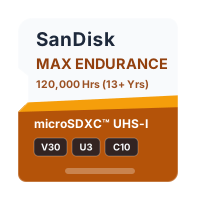
128GB SanDisk MAX Endurance microSD Card

128GB SanDisk MAX Endurance microSD Card

Format / TypemicroSD UHS-I
Speed ClassU3 / V30
Speed Rating100 MB/s Read • 40 MB/s Write (manufacturer maximums)
EnduranceUp to 120,000 hours (manufacturer rating for 256GB/512GB)
🛡️ Tested Alternative ££ • Mid-Range Alternative
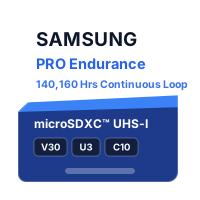
128GB Samsung PRO Endurance microSD Card

128GB Samsung PRO Endurance microSD Card

Format / TypemicroSD UHS-I
Speed ClassU3 / V30
Speed Rating100 MB/s Read • 40 MB/s Write (manufacturer maximums)
EnduranceUp to 140,160 hours (manufacturer rating for 256GB)

Disclosure: As an eBay Partner and Amazon Associate, Which Memory Card may earn a commission from purchases. About Us →

💡 Tip: On eBay you can choose between Brand New or SanDisk Refurbished options depending on your budget. What's the difference? →

Official Specifications, Formatting & Manual Source

Max Official Capacity: 128GB (Tested up to 128GB)

Setup / Formatting: exFAT (Format inside Dash Cam menu every 3–4 weeks)

Minimum Speed Class: U3 / V30

Technical Note: Requires constant sustained U3 / V30 write speeds, especially if a Rear Camera module is connected.

⚠ Manufacturer Warranty Notice: Western Digital specifically excludes continuous recording (dashcam and CCTV use) from standard consumer card warranties. Only dedicated High Endurance and MAX Endurance models are covered. View Western Digital / SanDisk Official Warranty Terms ↗

📋 Official Spec / Manual Source: Nextbase 322GW Official User Manual & SD Card Specs ↗

Need help formatting or fixing an error? See our guides for Windows 10/11, Mac, Dashcam/Camera Card Error Fix, or Garmin Card Degraded Fix.

Frequently Asked Questions: Nextbase 222XR & 322GW Rear Camera Bundle

What memory card or USB stick do I need for Nextbase 222XR & 322GW Rear Camera Bundle?

Get a 128GB SanDisk High Endurance or MAX Endurance microSD card. Nextbase 222XR & 322GW Rear Camera Bundle uses a microSD Card rated U3 / V30. Avoid standard non-endurance cards—dashcams overwrite video non-stop and will quickly burn out standard consumer cards, causing frozen screens or 'SD Card Error'.

What is the maximum SD card or USB size supported by Nextbase 222XR & 322GW Rear Camera Bundle?

The official maximum supported capacity for Nextbase 222XR & 322GW Rear Camera Bundle is 128GB (tested up to 128GB). For the best balance of price and reliability, our recommended sweet-spot size is 128GB.

How much video or how many photos will a card hold in Nextbase 222XR & 322GW Rear Camera Bundle?

Dual-channel recording (front + rear camera simultaneously): 64GB ≈ 4 hrs • 128GB ≈ 8 hrs continuous loop.. Choosing 128GB gives plenty of headroom without overpaying.

Can I use a cheaper or slower card with Nextbase 222XR & 322GW Rear Camera Bundle?

Standard non-endurance cards are not built for continuous loop recording and their warranty is voided in dashcams. Standard consumer cards (such as SanDisk Ultra) are not built for continuous loop recording and wear out quickly. Crucially, Western Digital's official warranty terms explicitly exclude dashcam and surveillance use on standard consumer cards (only dedicated High Endurance and MAX Endurance models are covered by warranty). Requires constant sustained U3 / V30 write speeds, especially if a Rear Camera module is connected.

How should I format the memory card or USB stick for Nextbase 222XR & 322GW Rear Camera Bundle?

Setup requirement: exFAT (Format inside Dash Cam menu every 3–4 weeks). For best results, format a brand-new card directly inside the Nextbase 222XR & 322GW Rear Camera Bundle settings menu upon first installation to establish the correct cluster size for continuous loop recording. We recommend reformatting every 3–4 weeks to clear protected event files.

Does the memory card brand matter for Nextbase 222XR & 322GW Rear Camera Bundle?

Yes. Unbranded or counterfeit marketplace cards frequently spoof their capacity or fail to sustain U3 / V30 write speeds, leading to corrupted recordings or 'Card Error' warnings. Stick to genuine, branded cards from a reputable retailer to ensure full manufacturer warranty coverage.

Other Popular Nextbase Dashcams Models

Nextbase Cabin View & Rear Window Camera Module → Garmin Dash Cam Mini 2 & Mini 3 → Garmin Dash Cam Mini 2 → Garmin Dash Cam Mini 3 → Garmin Dash Cam 47 / 57 / 67W / Live → Garmin Dash Cam 67W → Garmin Dash Cam 57 & Dash Cam 47 → Garmin Dash Cam X110 / X210 / X310 (4K) → Garmin Dash Cam Tandem & Dash Cam 66W / 56 → Garmin Dash Cam 66W →

Disclosure: Which Memory Card is an independent flash storage guide. As an eBay Partner and Amazon Associate, we may earn a commission from qualifying purchases at no extra cost to you. About Us & Verification Methodology →